
How to Run a Records Cleanup That Sticks

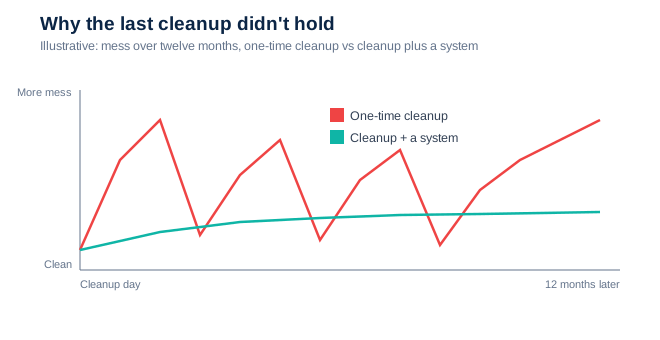
You have done the big cleanup before. Someone declared drive-cleanup week, a few people gave up their weekend, and for about six weeks the shared drive was pristine. Then it wasn't. And the cleanup after that one was bigger, because the backlog had grown while everyone avoided looking at it.
Here is the thing nobody says out loud during cleanup week: the mess is not the problem. The mess is a symptom. If you clean it without fixing what produced it, it grows back — every single time, on a schedule you could almost predict. The goal of a cleanup that sticks is not a clean drive on Friday. It is a drive that is still clean in six months without anyone declaring another emergency.
Why the last cleanup didn't hold
The last cleanup was an event. It had a start and an end, a hero or two, and a sense of relief when it was done. What it did not have was a rule that governed the very next file someone saved on Monday morning. With no naming convention, no owner, and no default place for new things, entropy simply resumed. The drive did not get messy because people are careless. It got messy because the system's default state is mess, and a one-time cleanup does nothing to change the default.
The cleanup that sticks, in five moves
Freeze and photograph first. Before you move a thing, snapshot the current state — a screenshot of the folder tree, a count of files. You need a before to prove the after, and you must never delete what you have not first captured.
Sort by decision, not by date. People do not search by the month a file was created; they search by the thing they are trying to do. Organize around projects, matters, or decisions — the units your team actually thinks in — not around timestamps.
Name it once, name it forever. Write a naming convention a stranger could follow: date, project, document type, version. The test is simple — could a new hire name a file correctly on their first day without asking? If not, the convention is too clever.
Give every folder an owner and a default. Each area needs one named person who is responsible for it, and one obvious answer to "where does a new file go?" Ambiguity about where things belong is the single largest source of drift.
Install a twenty-minute reset. Put a short, recurring tidy on the calendar — weekly or monthly. Twenty minutes of maintenance, done regularly, quietly prevents the twenty-hour rescue that everyone dreads.
The twenty-minute rule beats the twenty-hour rescue
The heroic cleanup feels productive precisely because it is dramatic — a visible before-and-after, a weekend sacrificed, a story to tell. But a rescue on that scale is really a confession: it is proof that maintenance was not happening. Small, boring, regular upkeep does not make a good story, and that is why it works. It never lets the mess accumulate enough to become a project in the first place.
So run the cleanup — freeze it, sort it, name it, own it. But understand that the sorting was never the point. The point is the rule you leave behind, the one that catches the next file before it becomes the next backlog. Clean the drive once and you will clean it again next year. Change the default, and you may never have to run a cleanup week again.
Before your team schedules the next big cleanup, ask what would have to be true for it to be the last one. More practical field guides to running clean projects are published every week on the XNM blog.