
Anatomy of an Overrun: When Capital projects Outrun the Paperwork

the federal housing-supply push made one thing clear in 2024: getting capital projects approved is no longer the bottleneck. Delivering them — and being able to show your work — is.
The stakes are simple. When you can't show a decision, you don't just lose an argument — you lose time, money, and the benefit of the doubt, usually all at once.
Funded is not the same as finished
The pattern is familiar to legal teams: each system holds a piece of the truth, no system holds all of it, and the gaps between them are exactly where projects quietly bleed.
It compounds over time. Every handoff between legal teams and their partners is a chance for a version to fork, an approval to go unrecorded, or a commitment to survive only in someone's memory.
There is a reason this keeps happening even to careful legal teams. The tools that hold the work — email, shared drives, spreadsheets, a project app or two — were each built to do one job well, not to keep a single, time-stamped record of what was decided and why. So the record becomes a manual chore bolted onto the real work, and it is the first thing to slip when matters, executed documents, and evidence trails gets busy. In a year shaped by the federal housing-supply push, that one dropped chore is exactly what returns, months later, as a finding, a dispute, or a number nobody can explain.
When a project gets questioned, these are the items everyone scrambles for:
A funder's reporting requirement nobody mapped to a document
An approval that exists but isn't visible to the work
A commitment made in a meeting and never written down
The one attachment that proves the whole timeline
Make ready your resting state
The short list of what should never be left scattered:
Closeout and retention. What was delivered, who signed for it, and proof you kept what you must keep.
Invoices matched to the contract. Each dollar paid, tied to the commitment that authorized it.
The decision record. Who approved what, when, and on what basis — captured as it happened, not reconstructed under pressure.
Approvals and sign-offs. Every gate with a name and date attached, visible to everyone the decision touches.
Procurement justification. Why this vendor, this price, this process — documented at the time, not rationalized after.
None of this is a discipline problem. Diligent people lose records every day. It's a structure problem — and structure is fixable.
XNM-VISION turns the scattered exhaust of a project into a single auditable record. For legal teams, that means a partner, funder, or auditor can be answered in minutes, not weeks.
What changes the result for legal teams is not another database. It's that XNM-VISION captures the record as a by-product of the work, ingesting from the inboxes and folders you already use — so being ready costs no extra effort.
The lesson repeats across every sector. You don't survive scrutiny by preparing for it. You survive by never being in a position that needs preparing.
What the gap looks like from the inside
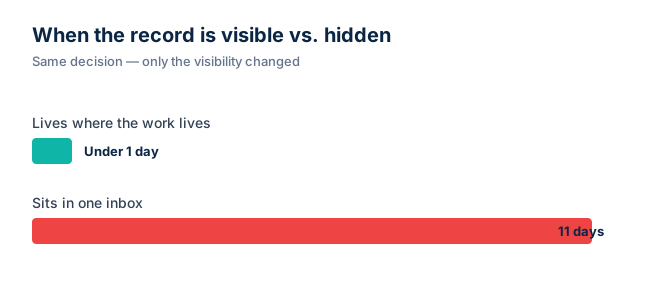
Step inside a typical capital file and the gap is rarely dramatic. It is a folder that holds the second-to-last version of the design. It is an email thread that ended in a verbal yes nobody wrote down. It is an approval that lives in one inbox while the people who need to act on it work somewhere else. None of these are failures of effort. They are failures of geography — the work and the record sit in different places.
For teams, the cost compounds because each fragment forces a second decision later: which copy is current, which approval is binding, which figure is the one a funder will see. Multiply that across a portfolio and the calendar starts to bend around lookup work instead of delivery.
In practice, you can usually predict where the next surprise will come from. The places that bleed most quietly tend to share a few traits:
The system that holds the document is not the system that holds the approval
The latest version is identified by filename convention, not by the record itself
A reporting requirement is tracked in a spreadsheet that lives on one person's desktop
A meeting decision is captured only in someone's notes, in shorthand only they read
A change order is in a binder; the budget it changed is in a different one
None of these are exotic. They are the normal residue of doing real work in tools that were never wired together. And once you can name them, you can stop being surprised by the consequences.
What audit-ready actually feels like in week one
The first week with a records engine in place does not look like a project. It looks like the same meetings, the same emails, the same approvals — except the trail builds itself as a side-effect of doing the work. Nobody is asked to switch systems on day one. The point is that the record lands somewhere the next person can find without asking.
Inside a few weeks, the pattern shifts. The question is no longer "who has the latest version?" It is "which version do we want to act on?" That is a smaller, more useful question, and it is the one teams should be answering anyway.
Name the spine. Pick the five record types that decide every file — typically scope, approvals, contracts, change orders, and the current version.
Stamp as you go. Every decision lands with a name and a date the moment it is made, not the week of the audit.
Wire the visibility. Anyone the decision touches sees the same trail at the same time — no forwarded PDFs, no "which version is this?" replies.
Close the loop on requirements. Each funder or regulator obligation is tied to the document that satisfies it, so a missing one is visible the moment it goes missing.
Hold the line. Resist the urge to track the same fact in a side spreadsheet. The trail is only useful if it is the only trail.
Why this matters for teams: it converts "audit-ready" from a sprint into a default. The next funder call, the next board question, the next handover to a new manager — each of those becomes a five-minute task instead of a two-week reconstruction.
How XNM-VISION helps: the records engine sits over the sources you already have and stitches them into one live trail. You do not move your files. You do not change your tools. You stop having to chase the truth across three systems to assemble it for someone else.
If your last review felt like a fire drill, that's a records problem, not a character flaw — and a solvable one. See how teams make ready their resting state with XNM-VISION.